

How AI is changing the way we create and optimize advertising creative, and why every marketer should care.
Introduction: Where does human imagination end and machine genius begin?
In recent years, artificial intelligence (AI) has been penetrating almost every area of digital marketing—from data analytics to email automation. One of the latest and most exciting innovations is Adcreative.ai, a platform that promises to generate powerful, converting ad creatives in minutes, without the need to hire a graphic designer or copywriter.
What makes Adcreative.ai so special? It’s a combination of deep-learning models that understand not only visual style but also consumer psychology, and an intuitive user interface that allows even non-technical users to create “ready-to-launch” ads in just a few clicks.
Artificial intelligence applications bridge the gap between today’s challenges and tomorrow’s possibilities, enabling us to innovate with precision and envision a future where technology and humanity thrive in harmony.
Zdenek Kocka
What AdCreative.ai can do
What AdCreative.ai can do – Ad creative generation: Creates visual ad designs and graphics for various formats (Facebook, Instagram, Google, banners). – Copy and text: Offers headline, description, and call-to-action suggestions that increase engagement. – A/B testing and conversion scoring: Predicts creative performance using internal models so you can select variants with higher potential. – Templates and branding: Allows you to upload your logo, fonts, and brand colors for consistent outputs. – Integration with marketing platforms: Easily connect with Facebook Ads, Google Ads, and other campaign deployment tools.
Who is the tool suitable for?
Who is the tool suitable for – Small and medium-sized businesses that do not have their own design teams. – Marketing agencies that need to quickly scale creatives for multiple clients. – E-commerce stores that often test different visual variations of product campaigns. – Freelance marketers and social media managers looking for efficiency.
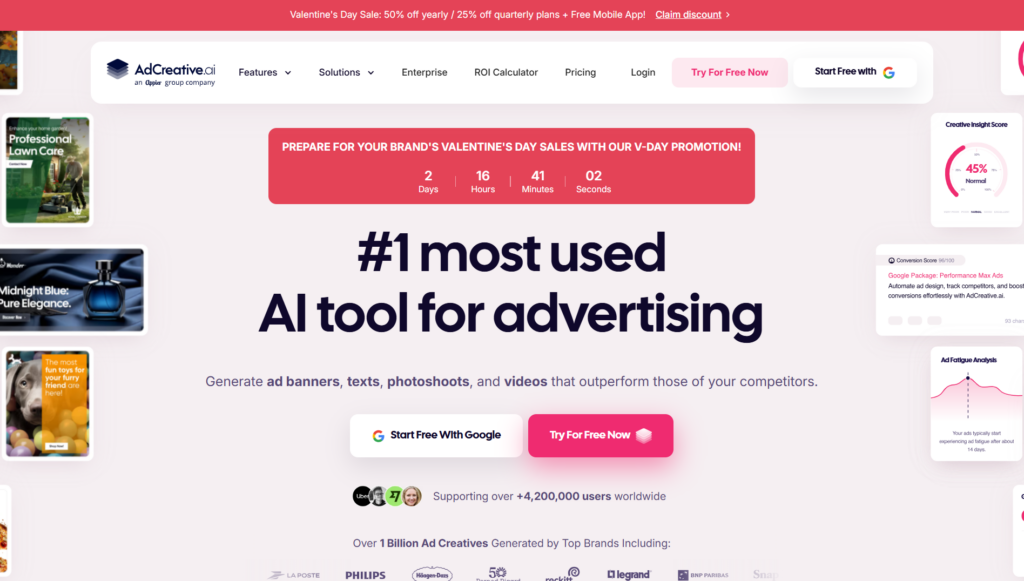
Practical tips for better results 1. Define your target audience: The more precisely you describe your audience (age, interests, behavior), the more relevant the AI suggestions will be. 2. Upload branding: Enter your logo, colors, and preferred fonts to ensure the output is consistent with your brand. 3. Experiment with multiple variations: Generate multiple versions of your creative and let the tool select or A/B test the best one. 4. Use predictive scores: Take this as a recommendation, not a dogma — always validate performance with real-world metrics. 5. Short and clear CTAs: Calls to action work better when they are concise and specific (e.g., “Buy Now,” “Get a Discount”).
Example workflow – Input: Upload product photos, logo, and specify your target audience. – Generation: The AI will generate 10-30 ad image and text suggestions. – Selection: Select 3 strong variations based on the predictive scores. – Testing: Run short A/B tests on a small target group. – Optimization: Use the data to fine-tune visuals, text, or targeting, then scale the winning variation.
Advantages and limitations
Benefits: – Speed: Makes creative creation much faster. – Scalability: Easily create hundreds of variations at once. – Data-driven approach: Designs are optimized for performance based on historical data.
Limitations: – Need for human supervision: AI may not always understand brand nuances or context. – Standardization of style: Some outputs may seem generic if they are not branded. – Ethics and accuracy: Ensure that texts are truthful and images are used legally.
Conclusion
Conclusion AdCreative.ai is a powerful tool for anyone who needs to create advertising creative quickly and effectively. When combined with a clear brief, corporate branding, and thorough testing, it can significantly reduce creation time and improve the results of advertising campaigns. For maximum effect, it is recommended to use AI as an assistant — the human eye and marketing strategy remain key.


















Leave a comment